
Table of Contents
Workflow Automation Strategies for Operational Efficiency
Workflow automation gets pitched as a shortcut to operational efficiency, and in a lot of ways it is. Software can move an approval from one desk to the next in seconds instead of days. It can pull data from one system into another without anyone retyping a thing. It can send a notification the moment a task is ready for the next step, instead of waiting for someone to remember to check.
But automation has a habit of exposing problems that were easy to ignore when a person was quietly working around them. If your process has gaps, inconsistencies, or steps nobody can quite explain, automating it doesn’t remove those problems. It just runs them faster, and often at a scale where they’re harder to catch.
This isn’t an argument against automation. It’s an argument for sequencing it correctly. The organizations that get real efficiency gains from automation tend to do the unglamorous work first: understanding the process, deciding what’s actually worth automating, and only then choosing the tools.
Why Automation Doesn’t Fix Broken Processes
It helps to separate two different problems that often get lumped together: a process that’s slow, and a process that’s wrong.
A slow process is one that works the way it’s supposed to but takes longer than it should, usually because of manual handoffs, waiting on approvals, or duplicate data entry. Automation is genuinely good at fixing this kind of problem. Removing the wait time between steps is exactly what automation tools are built for.
A badly designed process is different. It might have an approval step that doesn’t actually add oversight, a data field that gets filled in inconsistently depending on who’s doing it, or an exception path that only exists because someone once forgot a step and everyone adjusted around it. Automating a process like this doesn’t correct any of it. It just locks the inconsistency into the system and executes it every time, without the judgment a person might have applied to catch something that looked off.
This is where a lot of automation initiatives lose momentum. Six months in, someone notices that the automated workflow is generating errors, or that people have quietly built manual workarounds because the automated version doesn’t handle a common exception well. At that point, the fix usually isn’t a technical one. It’s going back and doing the process analysis that should have happened before automation was built.
The practical takeaway is straightforward: before automating anything, be honest about whether the process itself is sound. If it isn’t, redesign it first or alongside the automation work, but never treat automation as a substitute for fixing it.
Start With the Map, Not the Tool
It’s tempting to start a workflow automation project by evaluating tools. Vendors make this easy, since most automation platforms come with demos built around clean, idealized workflows that look nothing like the version your team actually runs.
A better starting point is a simple process map: every step, every handoff, every approval, and every place where data moves from one system or person to another. This doesn’t need to be an elaborate exercise. A whiteboard session with the people who actually do the work, followed by a written walkthrough, is often enough to surface the real shape of the process, which is usually messier than anyone expected.
A few things tend to show up once a process is mapped out:
- Steps exist that nobody remembers the original reason for, but everyone still does out of habit.
- Approval chains include people who rubber-stamp requests without reviewing them, adding delay without adding oversight.
- Data gets entered more than once in different systems because nothing connects them, and each entry point introduces its own chance for error.
- Exceptions happen more often than the “standard” path, which usually means the standard path was defined around an ideal case rather than the actual work.
Mapping the process before automating it does two things: it tells you which steps are genuinely worth eliminating or restructuring, rather than automating, and it gives you a much clearer picture of what the automated version needs to handle. Skipping this step is how organizations end up automating the demo version of their process instead of the real one.
Choosing What to Automate First
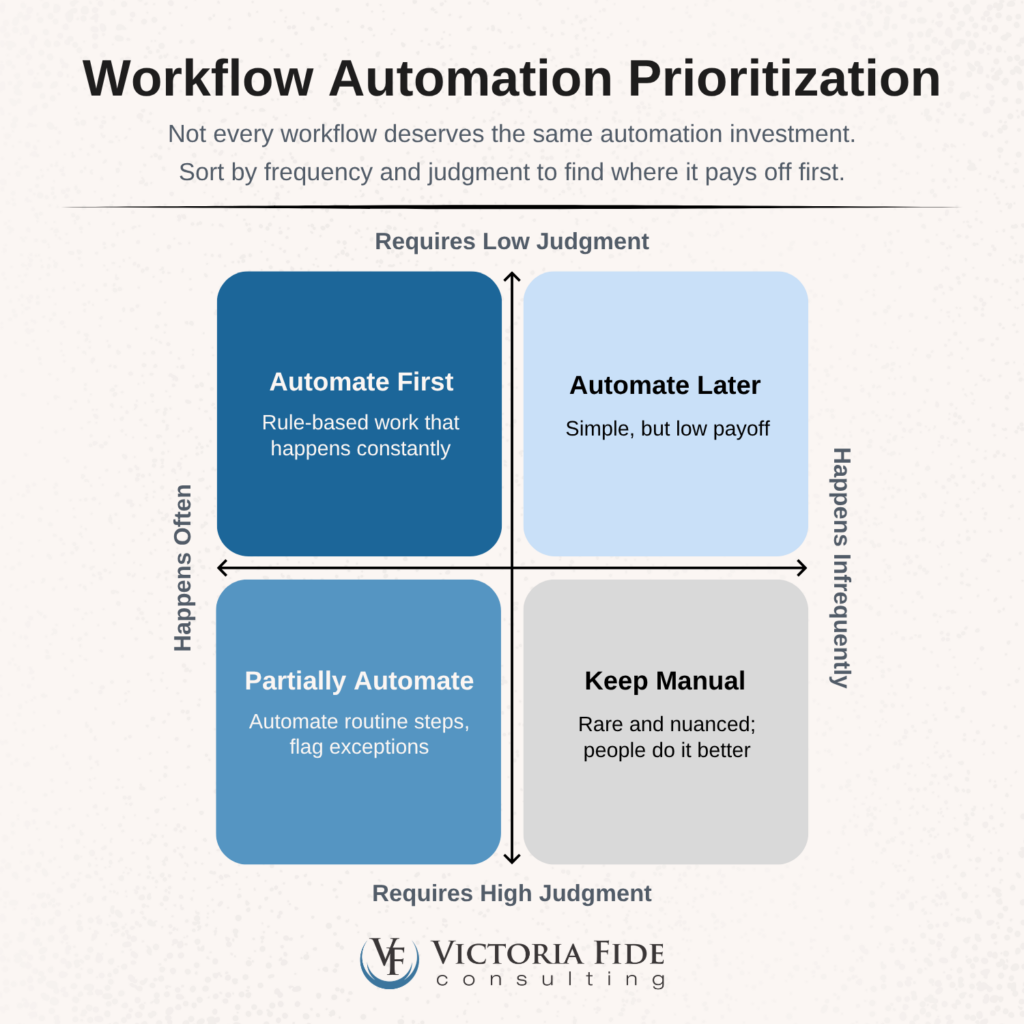
Not every part of a workflow deserves the same automation investment, and trying to automate everything at once is a common way for these projects to stall. A more useful approach is to sort tasks by two questions:
- How often does this happen
- How much judgment does it require?
High-volume, rule-based work is the strongest candidate for automation. Invoice matching, routine data entry between systems, status notifications, and standard approval routing all tend to follow predictable rules with few genuine exceptions. Automating these tasks frees up meaningful time because they happen constantly, and the logic behind them is usually simple enough to codify without much risk.
Judgment-heavy work is a different case. Tasks that require weighing context, exercising discretion, or handling situations that don’t fit a clean pattern are harder to automate well, and forcing them into rigid rules often creates more friction than it removes. These are usually better candidates for partial automation, where the system handles the routine parts and flags anything unusual for a person to review, rather than full automation.
There’s also a middle category worth mentioning: tasks that are high-volume but currently inconsistent, where different people handle the same task differently depending on preference or tribal knowledge. These are tempting to automate because of the volume, but they need standardization first. Automating three different versions of the same task at once usually just means picking one version arbitrarily and forcing everyone into it, which can create its own adoption problems.
A reasonable sequence looks like this:
- Automate what’s high-volume and already consistent first.
- Standardize what’s high-volume but inconsistent next.
- Leave judgment-heavy work for partial automation or leave it entirely manual, at least for now.
New tool from Victoria Fide
Find out where your implementation risk actually sits.
100+ structured questions. Six domains. Instant results.
Start the DX Implementation Risk Assessment free — evaluate your organization across the six domains most commonly behind ERP and digital transformation failures. Unlock the full analysis with prioritized action items for $297.
A Readiness Checklist Before You Automate
Before committing to automate a specific workflow, it’s worth confirming a few things are in place:
- The process is documented as it actually happens, not as it’s supposed to happen in theory
- A clear owner exists for the process, someone who can make decisions about exceptions and changes
- Exceptions are identified and accounted for, with a defined path for handling cases the automated system can’t
- The process has been standardized, so you’re automating one consistent version rather than several conflicting ones
- Success is defined in measurable terms, such as reduced cycle time, fewer errors, or reduced manual touches, so you can tell afterward whether the automation actually delivered
If a workflow can’t check most of these boxes, that’s a signal to slow down and do more groundwork rather than move straight to implementation.
Where to Go From Here
Workflow automation can deliver real operational efficiency, but only when it’s applied to a process that’s already sound. The organizations that see the strongest results tend to spend more time upfront on process mapping and prioritization than on tool selection, because the tool was never really the hard part.
If you’re not sure whether your current processes are ready for automation, or you suspect some of them need restructuring before automation makes sense, that diagnostic work is exactly where a structured business process improvement engagement helps. Learn more about our Business Process Improvement services.

Transformation is not easy, but it doesn’t have to be impossible. Take control of your project’s success today and schedule a free 30-minute consultation to find out how Victoria Fide can equip you for transformational success.
